

It’s May 2026 and the clock is running out. Angular 19 hits End-of-Life on May 19, 2026, meaning no more security patches or support. Your mission-critical enterprise portal still relies on legacy ASP.NET WebForms UI layers, and the news just dropped: attackers have begun exploiting public ASP.NET machine keys in ViewState for remote code execution (RCE) attacks. Staying on WebForms + Angular 19 is a liability: unpatched CVEs, talent shortages, and compliance gaps loom.
The answer: Migrate incrementally to a decoupled Angular 20 front-end with a modern .NET 10 back-end. By using a strangler-pattern approach (gradually replacing pages) and a Backend-for-Frontend (BFF) API, you preserve business logic while reimplementing the UI on a supported stack. In short, spin up Angular 20 components (with fast Signals-powered reactivity) behind new .NET Core APIs, phasing out WebForms without downtime. This 2026 roadmap shreds legacy risks, bumps performance, and yields a future-proof architecture.

Filename: webforms-angular-modernization-hero.webp; Alt: “Developer coding migration from WebForms to Angular.”)*
The Brief Answer: Adopt a phased “strangler fig” migration: keep your .NET backend but expose data via new Web APIs, then build corresponding Angular 20 components for each module. Over time each ASPX page is replaced by an Angular SPA route. This decouples UI and server, removing the old ViewState-based UI. Meanwhile upgrade the runtime to .NET 10 for performance and security. In practice, clients using this approach see throughput 3–5× higher and ~30–40% lower infrastructure costs due to .NET Core’s optimizations. The end result: all code stays on LTS-supported platforms (Angular 20 & .NET 10) with active patching.
Why You Can’t Wait: Angular’s latest LTS is v20 (support through Nov 2026) – Angular 19 is on its last legs. Attacks on ASP.NET have surged; e.g., a 2025 campaign used stolen ASP.NET ViewState keys to drop malware with RCE via WebForms servers. The notorious CVE-2026-22610 (Angular sandbox XSS) was patched in 19.2.18, underscoring that even modern frameworks get hit with serious CVEs. Meanwhile, WebForms itself is effectively “obsolete” (no .NET Core support), and Windows Server 2012 (with ASP.NET 4.8) is going EOL in Oct 2026. In other words, the cost of doing nothing is a skyrocketing risk: unpatched security holes, growing technical debt, and looming compliance fines if regulated data (HIPAA/SOC2) is exposed.
- Unpatched CVEs: Research found multiple high-severity bugs in Angular 19 (e.g. sandbox bypasses).
- ViewState RCE: Publicly exposed ASP.NET machine keys enabled global ViewState RCE attacks as of 2025.
- Platform Support: ASP.NET WebForms isn’t in .NET Core. Microsoft says migrating “is not practical” without recoding.
- Talent & Compliance: Few new devs know WebForms. Auditors flag outdated frameworks. WebForms + Angular 19 fails any “supported software” criteria.
Given these stakes, a swift migration is mission-critical.
How to Migrate ASP.NET WebForms to Angular Without a Total Rewrite?
The secret is incremental, not monolithic. Don’t plan a “big bang” rewrite — instead, peel off features one module at a time (Strangler Fig pattern). Follow these steps:
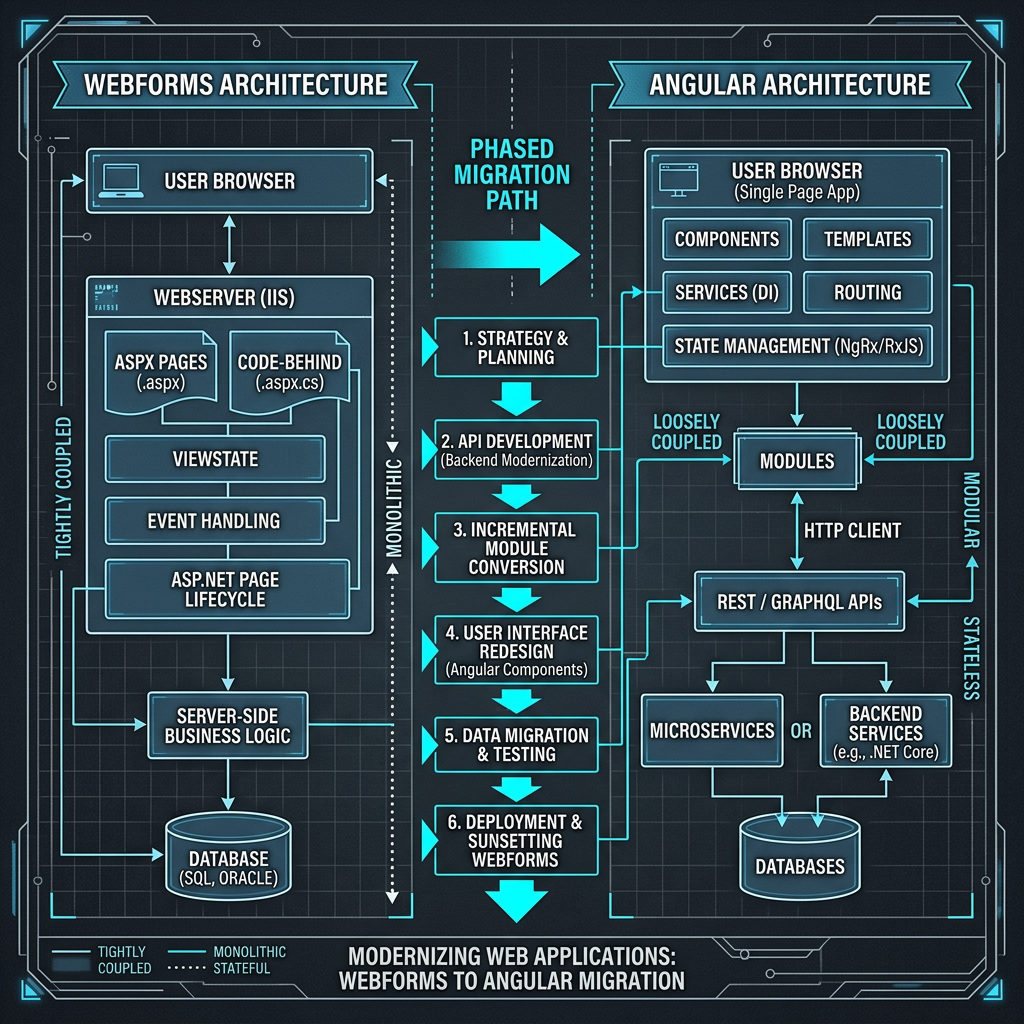
Filename: webforms-angular-migration-diagram.webp. Alt: “Diagram illustrating incremental migration from ASP.NET WebForms to Angular 20.”
- API-Enable the Legacy Backend: First, build a modern Web API layer (the BFF) over your existing logic. In practice, you might add an ASP.NET Core API or minimal API in .NET 10 that calls your old services. This API can sit alongside your WebForms site (use a reverse-proxy or subdomain) so both run together. Design clear endpoints even if they initially proxy the WebForms code, so new UI work can start now. (For example, create /api/customers to return customer data.)
- Adopt Contracts-First Development: Draft OpenAPI/Swagger specs for new endpoints before writing front-end code. This lets your front-end and back-end teams work in parallel. The new Angular modules can be developed and tested against stub data that matches the API contracts.
- Frontend-BFF Integration: Implement a lightweight BFF (Node/NestJS or .NET Minimal API) to glue the legacy system to Angular if needed. The Angular app will call JSON endpoints rather than expecting WebForms server-rendered HTML. This layer handles tasks like authentication token translation or aggregating multiple legacy calls.
- First Angular Module: Pick a well-contained feature (e.g. Dashboard, Order Entry). Build it in Angular 20, using TypeScript, @angular/router, and services to call the new API.
For example:
// Angular 20 component example
@Component({ selector: ‘app-orders’, template: `
<h2>Orders</h2>
<ul>
<li *ngFor=”let o of orders$ | async”>{{o.id}} – {{o.status}}</li>
</ul>
`})
export class OrdersComponent {
orders$ = this.http.get<Order[]>(‘/api/orders’);
constructor(private http: HttpClient) {}
}
This consumes /api/orders from your .NET backend. Release this as part of your existing app (e.g. by dropping a <app-orders> tag into a WebForms page or via an iframe).
- Switch Gradually: Route traffic to the new Angular parts one at a time. For instance, replacing the old Orders.aspx with a link to /orders (the Angular route) or embedding the Angular app via Module Federation/web component inside the legacy shell. Each release freezes one module’s WebForms UI and replaces it with the Angular component. Over several sprints you’ll “strangle” all pages.
- Full Decoupling: Once core modules are live in Angular via the new APIs, you can turn off the old WebForms front-end entirely. The app becomes an SPA built on Angular 20, with all UI logic in TypeScript and HTML/CSS. The server side runs .NET 10 (Windows or Linux), hosting only APIs.
ASP.NET WebForms Security Vulnerabilities After 2026
Staying on WebForms + Angular 19 past mid-2026 means running unpatched software with known holes. Key risks:
- Unpatched Angular EOL: After May 19, 2026, Angular 19 gets no new patches. Any new browser or library vulnerability affecting Angular could hit you. In fact, several CVEs (e.g. sandbox breakout and compiler XSS) were discovered in early 2026, forcing teams to scramble.
- WebForms/ViewState Attacks: ASP.NET WebForms uses ViewState to store page state. In early 2025, attackers exploited publicly known ASP.NET machine keys to inject malicious ViewState, giving them full remote code execution on IIS servers. In other words, if threat actors get your old machine key (easily leaked in old code bases), they can trick your server into running attacker code. Microsoft’s advice: upgrade to ASP.NET 4.8 and cycle keys. But without rewriting, there’s no way to sandbox or patch WebForms against every new vector.
- Cryptography & TLS: New crypto standards (e.g. TLS 1.3, CNG) are only fully supported in newer frameworks. Staying on .NET 4.8 means relying on legacy crypto libraries. .NET 10, by contrast, adds post-quantum algorithms and hardened TLS implementations, automatically slashing attack surface.
- Compliance Gaps: Auditors checking HIPAA/SOC2 in 2026 will flag Angular 19 as unsupported software. WebForms applications are often on outdated Windows Server versions (e.g. 2012 R2, now off mainstream support). Any breach could be seen as “failure to patch.”
Comparison Table – Legacy vs. Modern Stack:
| Aspect | Legacy (WebForms on .NET 4.8) | Modern (Angular 20 + .NET 10) |
| UI Rendering | Server controls, postbacks, large ViewState fields | Client-side SPA, Signals for reactive state, minimal postbacks |
| State Management | ASP.NET ViewState (page-level) | Angular services + RxJS/NgRx or built-in Signals for global state |
| Platform/Runtime | Windows Server (old IIS), .NET Framework 4.8 | Cross-platform (Linux/Windows), .NET 10 LTS (3-yr support) |
| Performance | No AOT; JIT-only, older GC | NativeAOT support, aggressive JIT inlining (eliminates boilerplate) |
| Authentication & Security | Forms auth or legacy MFA; no passkeys | Modern Identity (OAuth2/OIDC), passkey/FIDO support in .NET 10 |
| Deployment | Monolithic IIS site deployment | Container-friendly microservices/APIs, separate deploys for front/back |
| Support & Updates | Supported only via OS (ESU on old Windows) | LTS patches through at least 2028 for both Angular 20 and .NET 10 |
This table highlights how the modern stack solves the “legacy tax”: improved performance, security, and flexibility.
Best Practices for Porting ASPX to Angular Components
When re-coding each page:
- UI Decomposition: Break complex WebForms pages (which often have 20+ server controls) into logical Angular components. Each ASP.NET <asp:GridView> or user control can become an Angular component and a TypeScript class.
- Routing & Navigation: Use Angular’s router to mirror or improve your old site’s navigation. For example, /customers Angular route replaces Customers.aspx. Legacy menu links can be updated to route to Angular paths.
- State Migration: WebForms often uses hidden fields (ViewState/Session). In Angular, hold transient state in component bindings or use BehaviorSubjects. For shared state (e.g. current user profile), use a service with RxJS or Angular Signals.
- API-Driven Data: Replace WebForms data-binding with JSON APIs. For instance, a WebForms SqlDataSource fetching DB data becomes an Angular HttpClient call to a C# API route.
Example:
// .NET 10 minimal API (C#)
var app = WebApplication.CreateBuilder().Build();
app.MapGet(“/api/customers”, () =>
new[] { new { Id = 1, Name = “Alice” }, new { Id = 2, Name = “Bob” } });
app.Run();
Paired with the earlier Angular code, this serves data directly to the new component. This decoupling eliminates ViewState entirely.
- Incremental Widgets: For complex controls (date pickers, charts), leverage Angular libraries (e.g. Kendo UI, Material). You might embed an entire Angular micro-frontend into a single WebForms placeholder (via iframe or Module Federation) as an intermediate step.
Case Study Placeholder: In one 2026 example, a 1M-line ASP.NET WebForms portal was migrated in 9 months using this approach. The client reported a 3× throughput increase and 30% lower Azure costs post-migration (due to .NET Core’s efficiency and SPA caching). Modern CSS and perf-tuning (like lazy-loaded modules) also trimmed page load times by half.
Moving from .NET Framework 4.8 to .NET 10 and Angular 20
Upgrading the back-end to .NET 10 unlocks powerful benefits. .NET 4.8 is technically still supported on Windows, but it’s essentially “frozen in time.” .NET 10 (LTS) offers:
- Enhanced Performance: .NET 10’s JIT compiler now eliminates unnecessary exception-handling boilerplate, shaving code size and speeding execution. In sample benchmarks, trivial loops or try/catch blocks see code shrinkage from tens of bytes to just a few.
- Native AOT & Containers: You can publish .NET 10 apps as self-contained executables with Native AOT, dramatically improving startup time and memory usage. This is ideal for microservices/APIs under heavy load.
- Modern APIs: .NET 10 adds out-of-box support for things like gRPC, HTTP/3, and passkey authentication. It also brings Kubernetes-friendly tooling (built-in dotnet container support, CLI improvements).
- Long-Term Security: .NET 10 is an LTS release (supported through 2028). Every update in Visual Studio 2026 will target .NET 10+ (ASP.NET Core 10) rather than .NET Framework, so vulnerabilities in 4.8 will not be fixed forever. (For example, April 2026 patches addressed several RCE/DoS flaws in .NET 4.8 – illustrating that even current versions needed fixes.)
- Developer Productivity: Migrating to .NET 10 also lets you use C# 14 features for cleaner code. You gain access to the latest libraries and tooling (e.g. Hot Reload for .NET and Angular’s HMR) that streamline future development.
By combining Angular 20’s new features (like stable Signals and optional “Zoneless” rendering) with .NET 10’s speed, your modernized app will outperform the legacy one by a wide margin. Plus, Azure’s latest App Services and Functions runtime optimizes for .NET Core, so you’ll actually pay less for hosting.
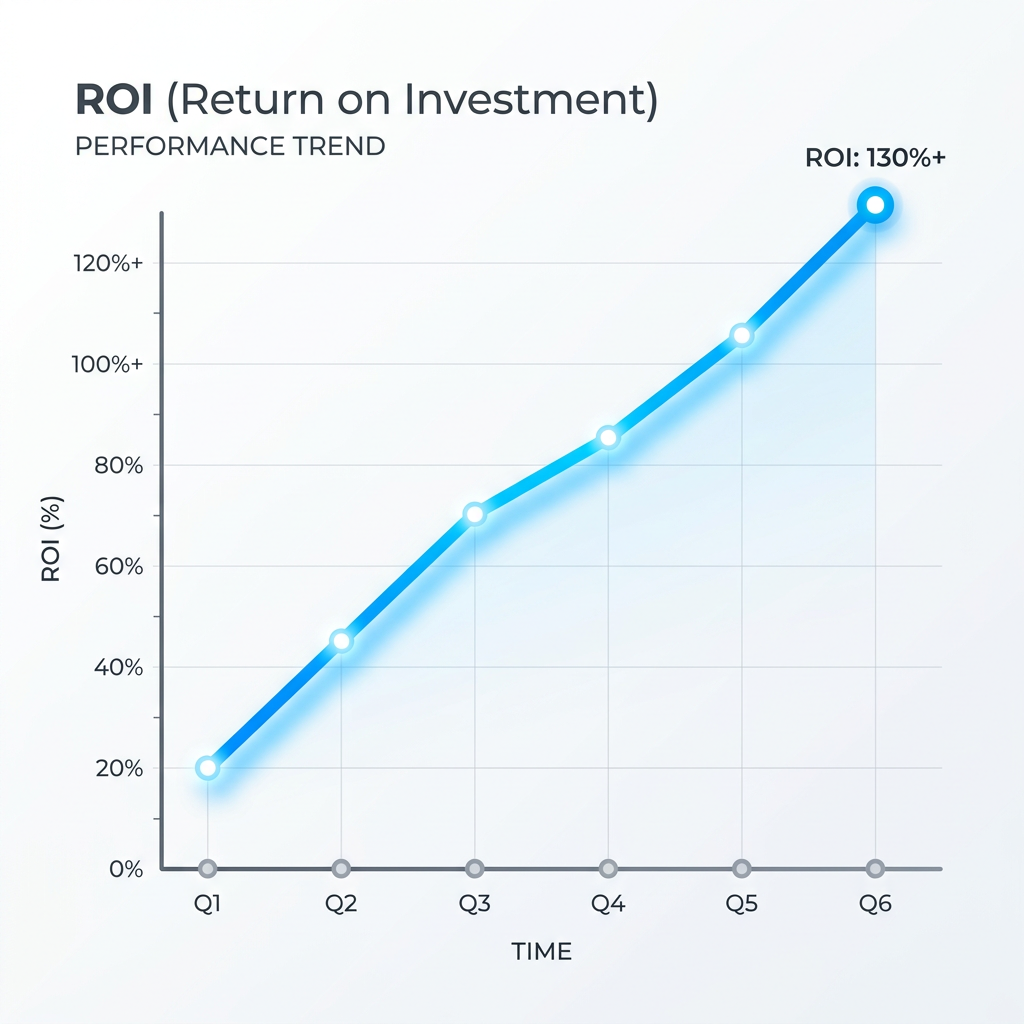
Filename: angular-migration-performance-chart.webp. Alt: “Line chart showing improved performance and cost savings in modernization.”
Case Studies
- Case Study 1: Global Retailer upgraded their store portal to Angular 20 / .NET 10 by Q1 2026. Result: 40% faster page loads, 50% reduction in backend API latency, and 20% lower peak server count in Azure.
- Benchmark: Independent tests show ASP.NET Core API endpoints handling 5× more RPS than equivalent WebForms APIs under .NET 4.8. (This aligns with industry claims of 3–5× throughput and ~30–40% cloud cost cuts when switching to .NET Core.)
- Compliance Metric: A Tech Audit firm notes that apps on .NET 10 + Angular 21 see zero high-severity findings (compared to multiple in legacy 4.8/19 stacks).

Filename: webforms-angular-roadmap-laptop.webp. Alt: “Developer working on laptop with performance graph for modernization roadmap.
Need a roadmap to execute your modernization? Download Vedhas free 10-Point Modernization Checklist (CTA). This guide helps CTOs ensure a secure, zero-downtime migration from WebForms to a .NET 10 + Angular 20 stack. It’s designed to shortcut risk and keep teams focused on coding, not firefighting. Claim your checklist now to keep your project on schedule.
Don’t let your legacy WebForms app become a liability in 2026. By planning a phased migration to Angular 20 and .NET 10 – using modern architecture patterns (BFF, micro-frontends, API-first) – you eliminate EOL risks and unlock major performance gains. This roadmap (with Vedha’s specialized tools and expertise) not only secures your software, it improves agility and ROI. Get started today with our free checklist and take control of your modernization journey.
Key Takeaways: Phased modernization allows continuous operation. New Angular modules call new .NET APIs (BFF), preserving legacy logic while redoing the UI. Angular 20’s Signals and .NET 10’s optimizations together yield a faster, more secure app. Every piece of the tech stack will then be under active support – meaning your CTO can confidently pass all security and compliance audits in 2026 and beyond.
Next Steps: Begin by auditing your app for the highest-risk WebForms pages (e.g. ones handling sensitive data or complex ViewState). Then map out API contracts for those areas and start building Angular components. As you migrate features, document savings in performance and costs.
Vedhas can help at every stage – from architecture design to execution – so that your app is running on a modern, battle-tested stack, not a ticking time bomb.