Why Your Migration Strategy Choice Matters More Than the Migration Itself
How to choose the right cloud migration strategy isn’t just a technical decision—it directly impacts migration costs, project timelines, scalability, and long-term ROI. Whether you’re evaluating Lift-and-Shift, Refactor, or Rebuild, selecting the right approach can determine whether your cloud migration delivers business value or becomes an expensive mistake.
Legacy systems are quietly consuming 70–80% of corporate IT budgets — a “legacy tax” that drains capital away from product development, market expansion, and the AI capabilities your competitors are already deploying — capabilities that remain out of reach as long as your data sits locked in legacy silos. For most enterprise leaders, the decision to migrate is no longer the hard question. The hard question is: migrate how?
That choice — Lift-and-Shift, Refactor, or Rebuild — has a bigger impact on your long-term costs, agility, and competitive position than the migration itself. Pick the wrong strategy for a workload and you either overspend on a rewrite that wasn’t necessary, or you move a broken system to the cloud and pay premium hosting costs for the same inefficiencies you had on-premises.
This guide gives you a clear, workload-by-workload framework to evaluate all three strategies — and make the right call for each system in your portfolio.
Cloud Migration Strategy at a Glance
If you’re wondering how to choose the right cloud migration strategy, start by evaluating three factors: application health, business objectives, and modernization requirements. There isn’t a single best approach for every workload. Instead, organizations should select the migration strategy that aligns with each application’s technical condition, timeline, budget, and long-term business goals.
In most enterprise environments:
| If your application… | Recommended Strategy |
|---|---|
| Needs to move to the cloud quickly with minimal code changes | Lift-and-Shift (Rehost) |
| Has a stable codebase but requires better scalability, performance, or lower cloud costs | Refactor |
| Is built on outdated technology, carries significant technical debt, or no longer meets business requirements | Rebuild |
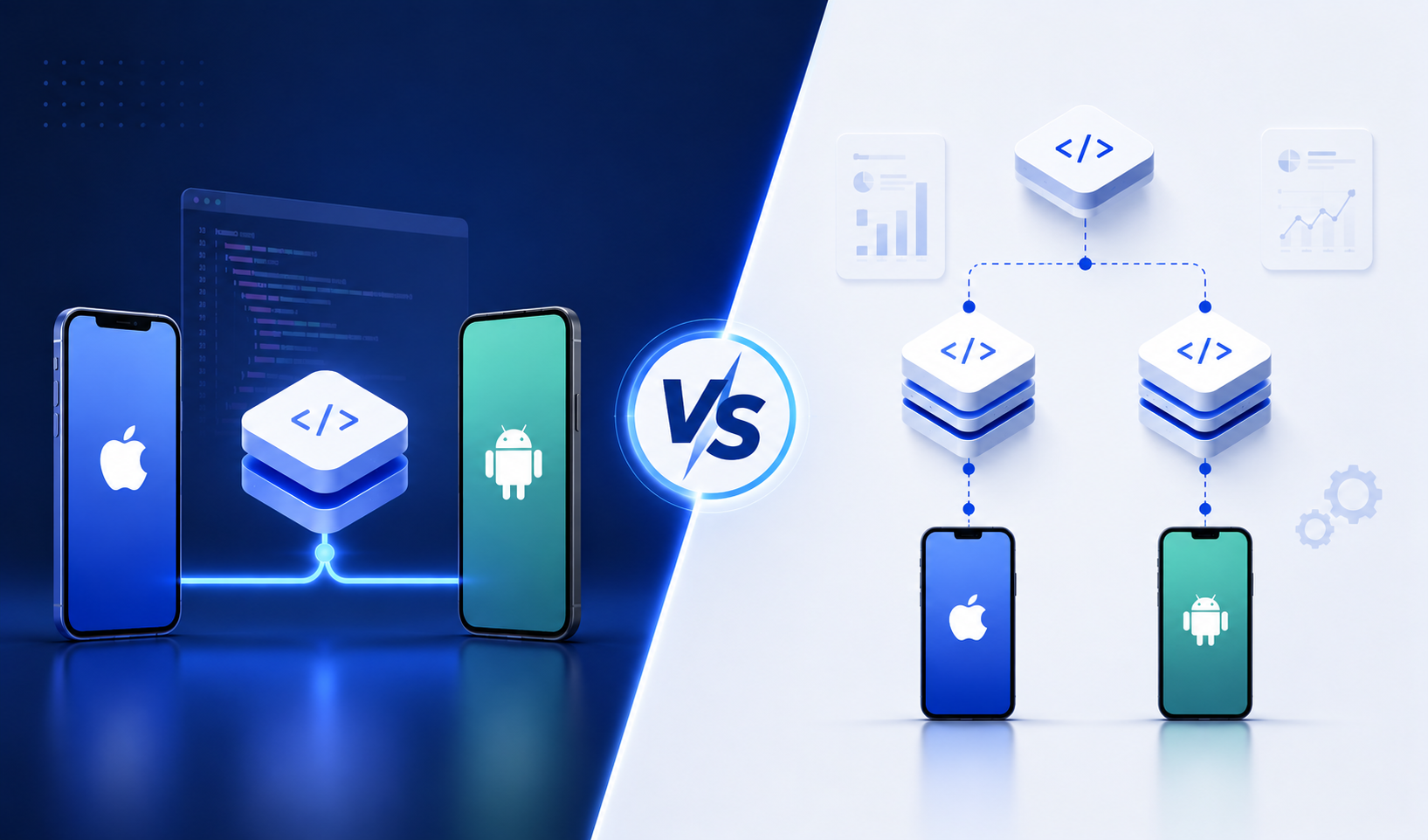
The most successful cloud migrations rarely rely on a single approach. Instead, organizations typically combine Lift-and-Shift, Refactor, and Rebuild across different applications to balance migration speed, cost, operational risk, and long-term return on investment.
The Cloud Migration Spectrum: Lift-and-Shift vs Refactor vs Rebuild
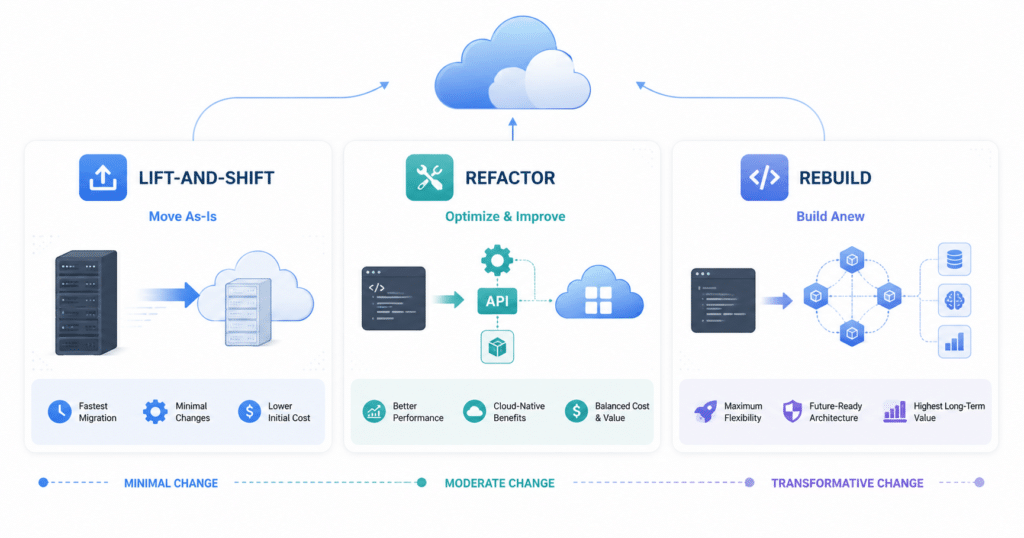
Modern enterprise cloud migration is not a one-size-fits-all process. Each workload in your portfolio has a different level of technical debt, business criticality, and tolerance for disruption — and the strategy you assign to each one determines whether your cloud investment pays off or compounds your existing problems.
| Evaluation Factor | Rehost (Lift-and-Shift) | Refactor (Modernize/Optimize) | Rebuild (Rewrite) |
|---|---|---|---|
| Upfront Capital Cost | Low ($40k–$150k per application) | Moderate ($200k–$600k+ per application) | High ($500k–$5M+ for full portfolios) |
| Implementation Timeline | 1–4 weeks per application | 2–6 months per application | 18–36 months |
| Operational Expense (OpEx) | High — unoptimized resource usage can cost 5–15% more than on-premises over 3 years | Low — well-executed refactoring reduces infrastructure costs by 30–50% | Lowest — cloud-native efficiency at scale |
| Codebase Impact | None — code remains unchanged | Targeted adjustments to architecture and configuration | Scrapped — entirely new code is written |
| Risk of Disruption | Minimal | Moderate | High |
| Long-Term ROI Potential | Low | High | Maximum |
Cost ranges reflect industry benchmark data for mid-market enterprise workloads. Actual costs vary based on application complexity, compliance requirements, and vendor selection. Sources: Hakuna Matata Tech (2026), CostSignals (2026), MigrationCost.com (2026).
Cloud Migration Strategy Decision Checklist
Before selecting a migration strategy, answer these five questions:
- Is the application still meeting current business requirements?
- Does the codebase have manageable technical debt?
- Will the application need AI capabilities or cloud-native scalability?
- Is there a strict migration deadline or compliance requirement?
- Does the expected business value justify refactoring or rebuilding?
If most answers indicate stability and urgency, Lift-and-Shift is usually the right starting point. If the application requires modernization without a complete rewrite, Refactor is often the best choice. If the application can no longer support future business goals, Rebuild typically delivers the greatest long-term value.
Rehost (Lift-and-Shift)
Rehosting moves applications from local hardware to cloud virtual machines without touching the application code or configuration. It is the fastest pathway to the cloud, making it effective for organizations facing immediate data center closures, physical lease expirations, or tight project deadlines. Because the architecture remains untouched, the upfront implementation risk is low.
The tradeoff is significant and frequently underestimated. Lift-and-shift on its own is often more expensive than on-premises on a three-year basis, adding 5–15% above the original baseline cost, because workloads are not optimized for cloud pricing. A monolithic application transferred as-is cannot use cloud-native scaling, dynamic containerization, or automated resource management — and will consume excessive memory and compute as a result. Lift-and-Shift is best understood as a transitional phase that buys time, not a modernization strategy in itself.
Choose Rehost when: You have a hard deadline, a stable non-critical workload, and low tolerance for implementation risk — with a clear plan to refactor within 12–18 months.
Refactor (Cloud Refactoring)
Refactoring makes targeted improvements to an application’s internal structure and deployment configuration without changing its external behavior. Common refactoring moves include shifting databases from self-managed virtual machines to fully managed cloud database services, containerizing application components for portable deployment, and integrating APIs to improve connectivity with external platforms and data sources.
This is the balanced approach. A well-architected refactoring can reduce cloud infrastructure costs by 30–50% compared to running unoptimized legacy workloads, with the partner investment typically recouped within 18–24 months through those cloud savings. For most enterprise workloads — particularly those that need to support modern data workflows or AI integrations — refactoring delivers the strongest combination of speed, cost reduction, and long-term scalability. Modernizing to current frameworks as part of a Refactor or Rebuild typically reduces application memory consumption by 40–60% and cuts serverless cold-start latency from seconds to milliseconds.
Choose Refactor when: The codebase is structurally sound but inefficiently deployed, and the business requires AI integration, dynamic scaling, or meaningfully lower ongoing operating costs.
Rebuild (Application Rewrite)
Rebuilding discards the existing codebase entirely and writes a new application from scratch using modern cloud-native architecture — microservices, serverless compute, and highly automated container environments. This pathway delivers maximum scalability, performance, and long-term cost efficiency. It is chosen when the legacy codebase is too fragile to modify safely, or when the core business logic must be fundamentally redesigned to support requirements like real-time data pipelines or AI-driven workflows.
The tradeoff is substantial. A full modernization effort with application refactoring and rebuilding can extend to 18–36 months, with large enterprise portfolios running $500,000 to $5 million or more. During this period the business must run parallel development and production environments, directly delaying ROI. McKinsey’s enterprise cloud research shows that roughly 60% of cloud migrations deliver below their projected ROI — and Rebuild projects, with their extended timelines and high parallel-run costs, are most exposed to this risk when executive alignment wavers mid-project.
Choose Rebuild when: The codebase is too fragile to refactor, the business logic needs fundamental redesign, and the organization has the multi-year runway and unwavering executive commitment to see it through.
No Strategy is Universally Correct
The migration plans that succeed assign each workload honestly to the right strategy. The plans that struggle default everything to Rehost or Rebuild. A single enterprise portfolio will almost always require all three strategies applied to different systems — and the discipline lies in assigning each workload to the right path rather than defaulting to one approach across the board. The framework for making those workload-level decisions is what the next section covers.
What Is a Cloud Migration Strategy?
A cloud migration strategy is a structured plan that determines how applications, data, and workloads are moved from on-premises infrastructure to the cloud. The strategy defines the migration approach, timeline, level of application modernization, expected costs, and operational risks. Common cloud migration strategies include Lift-and-Shift (Rehost), Refactor, and Rebuild, with each serving different business and technical requirements.
How to Choose the Right Cloud Migration Strategy: An Executive Decision Framework
Selecting the right modernization pathway requires evaluating each workload individually — not applying a single strategy across the entire portfolio. That shortcut is precisely what drives project delays, cost overruns, and unrealized cloud benefits. The three-step framework below gives technology leaders a repeatable, systematic way to make that workload-level call.
Step 1: Workload Discovery and Inventory Mapping
Start with a complete catalog of all existing IT assets — application dependencies, infrastructure baselines, and database configurations. This isn’t administrative housekeeping; it’s the foundation every subsequent decision rests on. Flexera’s 2025 State of the Cloud report found that 52% of organizations struggle to understand their own application dependencies, and that gap translates directly into inaccurate migration scope, extended timelines, and unplanned costs during execution. Connected applications must be identified and migrated together in structured waves — not discovered mid-project.
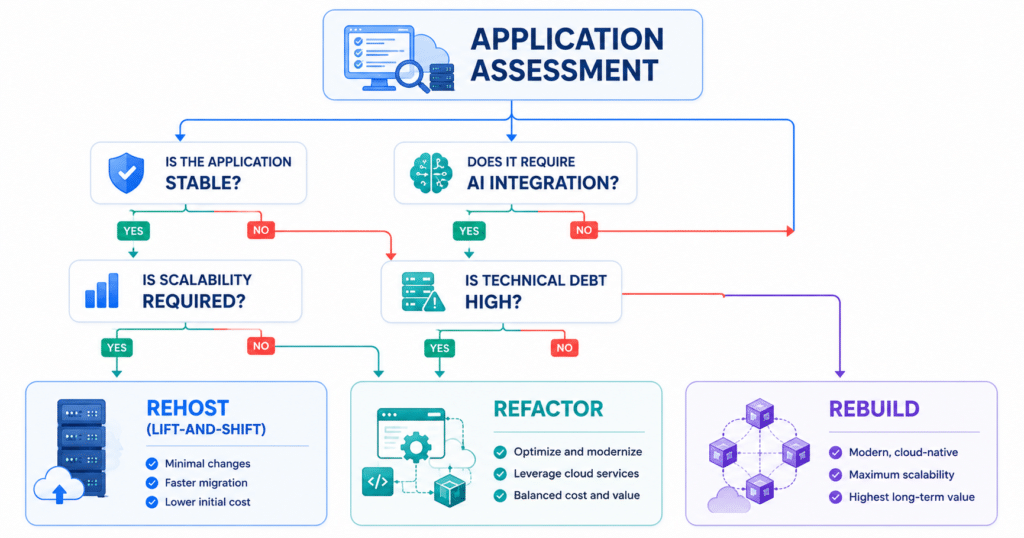
Step 2: Score Each Application Against Four Parameters
Once inventoried, score each workload against these four criteria:
- Business Criticality: How central is this application to daily operations and revenue generation? High-criticality systems demand lower disruption risk — which typically rules out Rebuild as a first move.
- Technical Debt: Is the code fragile, poorly documented, or dependent on obsolete frameworks? High technical debt in a business-critical system is the clearest signal that a Rebuild is inevitable — the question is only when.
- Regulatory Requirements: Does the application handle data subject to compliance standards? Compliance complexity adds cost and timeline to every strategy, but it adds disproportionately to Rebuild projects where the entire compliance architecture must be re-certified from scratch.
- Staff Capabilities: Does the internal engineering team have the skills to manage a cloud-native or containerized environment post-migration? A Refactor or Rebuild delivered to a team that can’t maintain it creates a new technical debt problem in place of the old one.
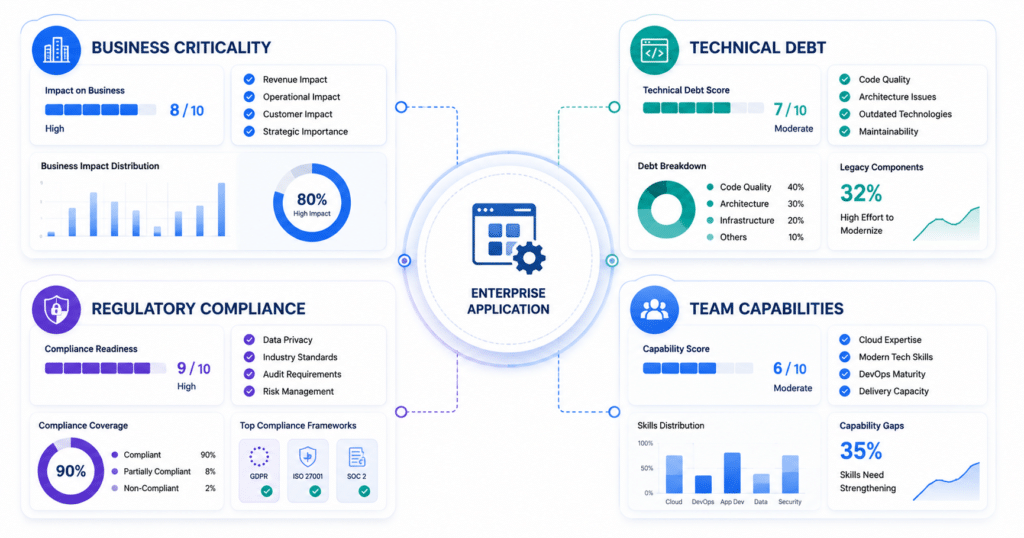
Step 3: Assign Each Workload to the Right Strategy
With scores in hand, the assignment logic follows a clear path. Rather than a decision tree, think of it as three plain questions asked in sequence:
- First — Is the codebase structurally serviceable?
If no: the application cannot be safely refactored. Move to the next question.
If yes: move to the second question. - Second — Does the business require AI integration, dynamic scaling, or lower OpEx from this workload?
If yes: Refactor. The codebase can support it and the business case justifies the investment.
If no: Rehost. The workload is stable, non-critical, and doesn’t need cloud-native capabilities yet. - Third — For workloads that can’t be refactored: is there a hard deadline?
If yes: Rehost now to meet the deadline, and schedule the Rebuild in the next planning cycle.
If no: Rebuild. The codebase is too fragile to carry forward and there’s a runway to do it properly.
To make this concrete: a patient billing system handling HIPAA-regulated data, built on a decade-old framework with no automated testing, scores high on technical debt, high on regulatory exposure, and high on business criticality. It cannot be safely refactored — the fragility makes targeted changes too risky. It scores as a Rebuild candidate, with a Rehost as a transitional measure if a data center lease expiration creates a hard deadline before the rebuild can begin.
What This Framework Produces
A completed assessment doesn’t produce a single migration strategy — it produces a tiered workload roadmap where each application has an assigned pathway, a sequenced migration wave, and a projected cost and timeline that reflects its actual complexity. That roadmap is what separates migrations that deliver ROI from those that don’t.
Managing Costs After Migration
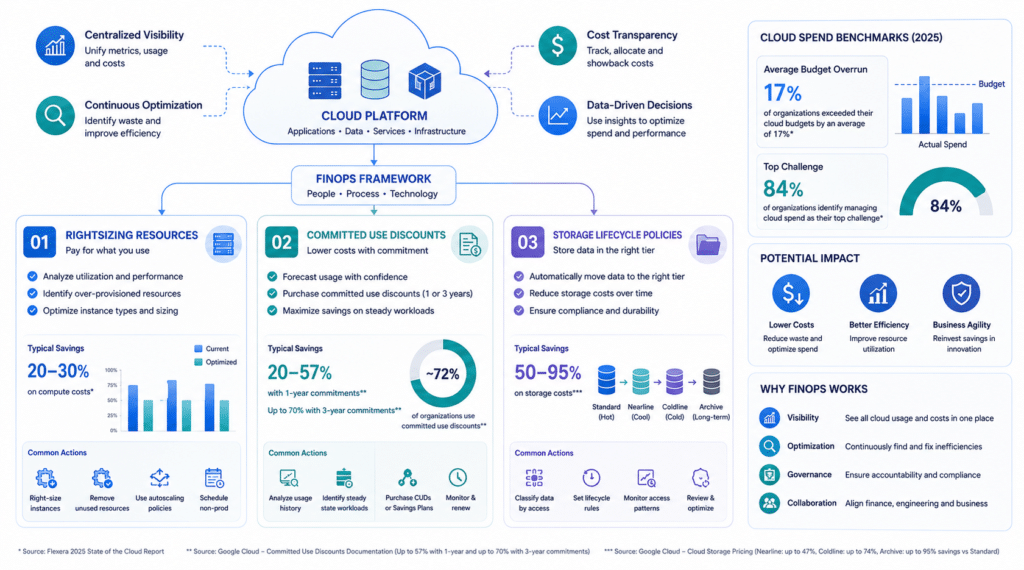
Choosing the right migration strategy is only the first half of the financial equation. What happens after migration determines whether the savings materialize or quietly evaporate. Flexera’s 2025 State of the Cloud Report found that 84% of organizations identify managing cloud spend as their top cloud challenge, with budgets already exceeding limits by an average of 17% — almost always traced back to over-provisioning resources to mirror legacy on-premises environments rather than optimizing for cloud economics.
The discipline that prevents this is FinOps — and it needs to be embedded from day one of the migration, not bolted on after the bills arrive. Three practices deliver the most immediate and measurable impact:
- Workload Rightsizing: Size cloud resources against real utilization data, not peak capacity assumptions carried over from on-premises. AWS Migration Evaluator data, analyzed by Bain & Company, shows that direct-match migration increases costs by 22%, while rightsizing those same workloads reduces costs by 36%. For non-production workloads — dev servers, batch processing, CI/CD pipelines — Spot Instances can reduce those costs by up to 90% compared to standard on-demand pricing.
- Committed Use Discounts: For stable, long-running workloads, Google Cloud’s Committed Use Discounts offer up to 57% off list prices for one-year commitments, and up to 70% on memory-optimized workloads under three-year terms. As of January 2026, GCP fully migrated eligible accounts to a direct-discount model, making savings cleaner to track and attribute.
- Storage Lifecycle Policies: Automated lifecycle rules move inactive logs, historical backups, and regulatory archives from premium Standard storage into colder tiers — Nearline, Coldline, or Archive. Moving data from Standard to Nearline, Coldline, or Archive can reduce storage costs by 50–95% depending on access frequency and tier selected.
Together, these three practices represent the difference between a migration that delivers its projected ROI and one that trades an on-premises cost problem for a cloud cost problem.
Why the Right Partner Changes the Outcome
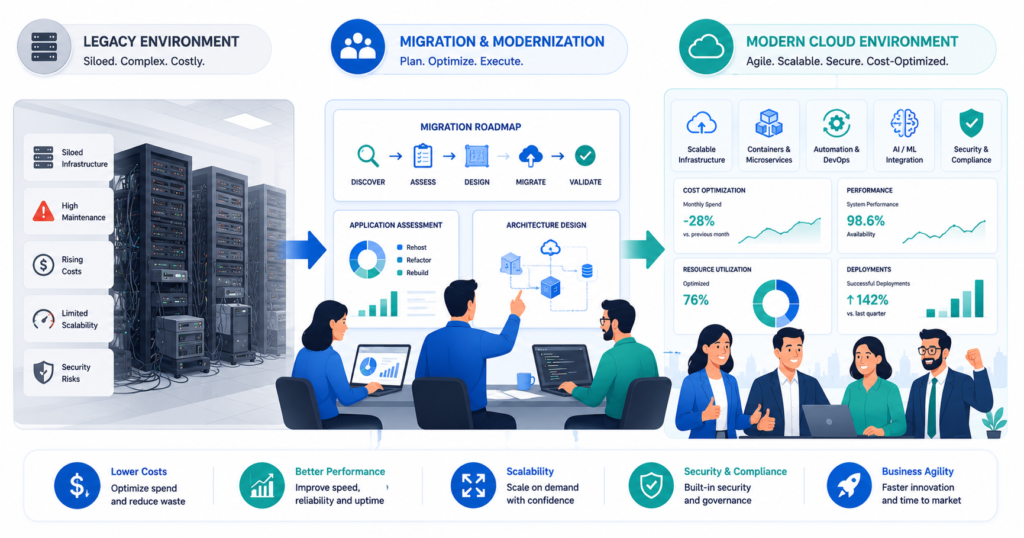
Selecting the right migration strategy for each workload is the first decision. Executing it without budget overruns, timeline slippage, or operational disruption is the harder one — and it’s where most migrations lose the ROI they were designed to deliver.
Vedhas Technology Solutions is a certified Google Cloud Platform Partner serving enterprise clients since 2017. The engagement model is built around three commitments that directly address the failure patterns covered in this article.
- A Structured Readiness Assessment Before Anything Moves. Every engagement begins with a comprehensive Infrastructure Readiness Assessment — certified cloud architects analyze current software systems, database structures, security baselines, and network dependencies. The output is a detailed cloud roadmap with precise workload classifications, projected TCO models, and a sequenced, low-risk migration timeline. This is the step that prevents the discovery surprises mid-project that McKinsey identifies as one of the most common drivers of cost overrun.
- Full Transparency on Cost and Timeline. Upfront project estimates with no hidden fees. All communications, project updates, and decisions documented and shared. Weekly alignment calls throughout the engagement. No surprises on scope, no ambiguity on accountability.
- Phased Implementation That Protects Operations. Workloads are migrated in structured waves — non-critical, low-dependency systems first. Every phase undergoes rigorous testing, validation, and performance benchmarking before cutover. Post-migration, systems are continuously monitored and optimized for resource efficiency, security compliance, and long-term cost control.
Start With a Conversation, Not a Commitment
You’ve seen the tradeoffs between Rehost, Refactor, and Rebuild. The harder part is knowing which strategy applies to each workload in your specific portfolio — and that’s precisely where costly mistakes happen without structured guidance.
The certified cloud architects at Vedhas Technology Solutions are available for a complimentary initial consultation. In that session, you’ll walk away with a preliminary read on your workload classifications, the migration pathways most relevant to your portfolio, and an initial cost and timeline projection — no commitment required.
Common Questions About Choosing the Right Cloud Migration Strategy
Can different applications in the same organization use different cloud migration strategies?
Yes. Most successful cloud migration projects use a mix of Lift-and-Shift, Refactor, and Rebuild. Each application should be evaluated individually based on its business value, technical debt, dependencies, and modernization goals.
How do I know if my applications are ready for cloud migration?
Start with a cloud readiness assessment. It identifies application dependencies, infrastructure requirements, security risks, compliance needs, and technical debt to determine the best migration strategy for each workload.
How can we reduce the risk of cloud migration delays and budget overruns?
Begin with a detailed migration roadmap, prioritize workloads based on business impact, migrate in phases, and continuously monitor costs and performance. Working with an experienced cloud migration partner also helps minimize unexpected risks.
Which cloud platform is best for my migration: AWS, Azure, or Google Cloud?
The right cloud platform depends on your existing technology stack, compliance requirements, scalability goals, and budget. A cloud assessment can help identify the platform that best aligns with your business and technical needs.
Can we migrate to the cloud without disrupting day-to-day business operations?
Yes. Most enterprise migrations are executed in phases with thorough testing, backup plans, and rollback strategies to minimize downtime and ensure business continuity.
How do I measure whether my cloud migration was successful?
Success should be measured using key metrics such as infrastructure costs, application performance, system availability, deployment speed, security posture, and return on investment against the original migration objectives.