Key Takeaways
The decision to modernize legacy ERP with AI is not a technology decision — it is a risk management decision. AI agents deliver the same operational outcomes as a replacement project at a fraction of the cost, in weeks rather than years.
- According to Panorama Consulting Group’s 2024 ERP Report, based on survey data from 131 organizations, more than half of ERP implementations run over their expected budget or timeline — with the median implementation taking 15.5 months and a median project cost of $450,000.
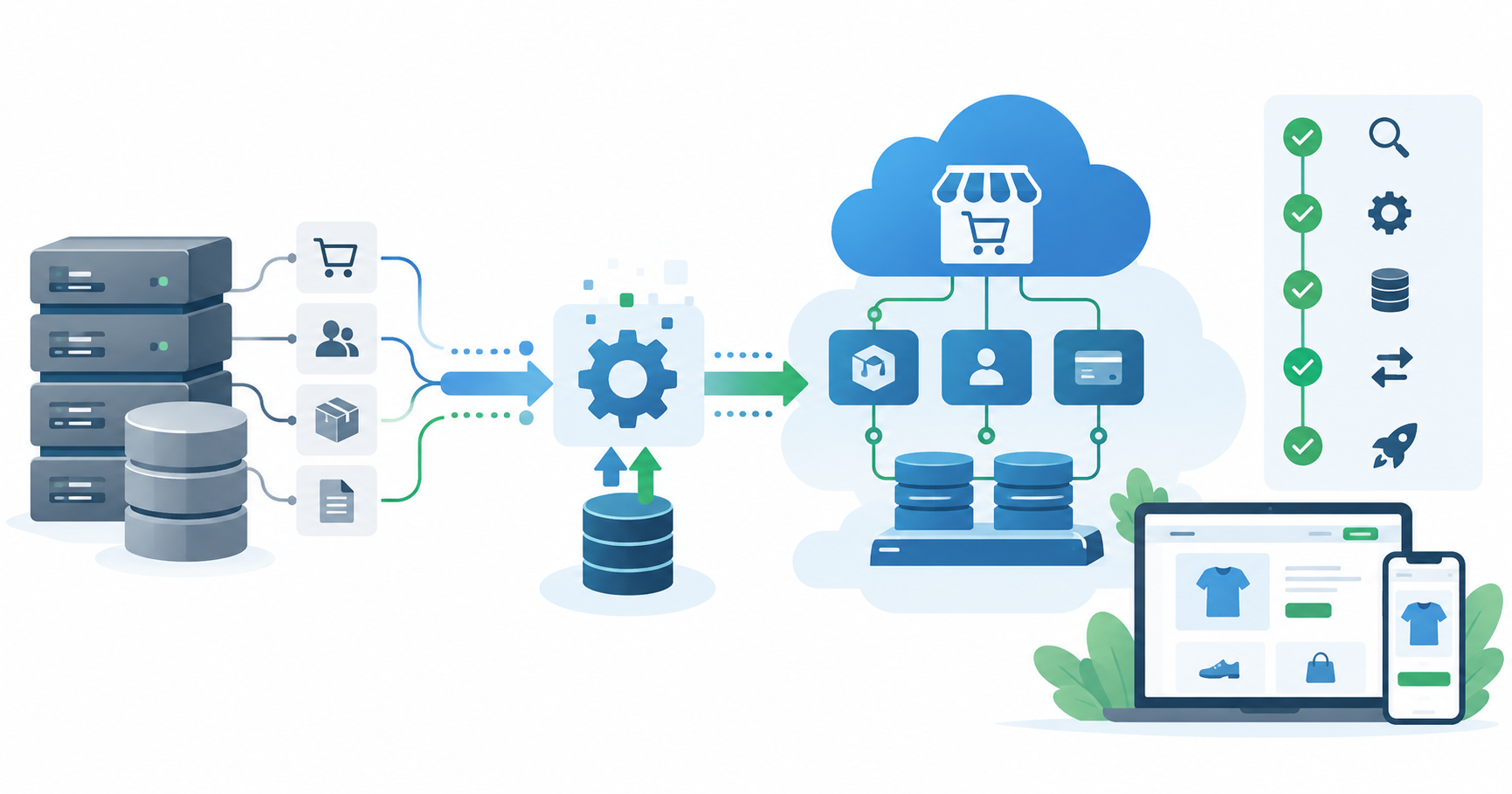
- AI agents act as an intelligent orchestration layer that communicates with your legacy ERP through APIs, database staging tables, or RPA bots — automating workflows without altering a single line of ERP code.
- The four highest-ROI use cases: automated document ingestion, conversational ERP querying, proactive exception alerting, and cross-system data sync.
- A production-ready AI agent layer on a legacy ERP typically deploys in 8–16 weeks. A full ERP replacement takes 18–36 months.
- TechVedhas AI integration builds: $15,000–$50,000 initial deployment. Ongoing support: $1,500–$5,000/month.
The Meeting No Executive Wants to Have
You have sat through some version of this conversation.
The VP of Operations is frustrated. Reports take two days. The accounts payable team manually keys every supplier invoice. The sales team can’t get live inventory numbers without calling someone in the warehouse. Customer service is running on spreadsheets they update by hand.
The recommended solution? Replace the ERP. The timeline presented: 24 to 36 months. The budget: upwards of $6-10 million when you account for licensing, implementation consultants, data migration, change management, and the six months of productivity loss while teams learn the new system.
The CFO frowns. The CTO looks uncomfortable. The meeting ends without a decision.
This is the ERP modernization trap: the obvious problems are real, but the obvious solution is genuinely unaffordable for most mid-market businesses — not just in cost, but in organizational risk.
What gets lost in these conversations is the third option. Not “do nothing” and not “rip and replace.” The option that modernizes legacy ERP with AI agents — layering intelligent automation over the existing system, solving the operational problems in weeks, and preserving the core database that took years to build and tune.
Why Ripping Out Your ERP Is Usually the Wrong Call
The appeal of a fresh-start ERP migration is easy to understand. You are replacing technical debt with a clean, cloud-native architecture. Reports are instant. Interfaces are modern. Everything connects.
The execution reality, however, is significantly harsher than the sales pitch.
Panorama Consulting Group’s 2024 ERP Report — based on survey data from 131 organizations that completed ERP projects — found that more than half of implementations ran over budget, over schedule, or both. The median implementation took 15.5 months and cost $450,000. These are not outlier projects. They are the median outcome.
The underlying reasons are structural:
- Data migration is the hidden killer. Your legacy ERP holds 10-30 years of transactional history — purchase orders, inventory movements, customer records, financial postings. Mapping, cleansing, and validating that data to fit a new system’s data model is the most expensive and risk-prone phase of any ERP project. It is also the phase most consistently underestimated during scoping.
- Dual-run disruption compounds operational errors. During a migration, operational teams run both the old and new systems simultaneously. Every transaction is entered twice. Data reconciliation between the two systems becomes a second job. Error rates spike. Teams burn out.
- Adoption failure can kill a technically successful project. A new ERP that goes live on time still fails if the team reverts to spreadsheets. According to research by McKinsey & Company on large-scale technology transformations, change management failures are among the top reasons digital programs fail to deliver expected value — and ERP replacements, with their scope and pace of change, are particularly exposed.
The harder, more useful question is not “which new ERP should we buy?” but “what specific problems are we actually trying to solve?”
In the majority of cases, those problems are operational: manual data entry, slow reporting, reactive exception handling, siloed systems. None of these require replacing the database. All of them are solvable with an AI agent layer built around what you already have.
What It Actually Means to Modernize Legacy ERP with AI
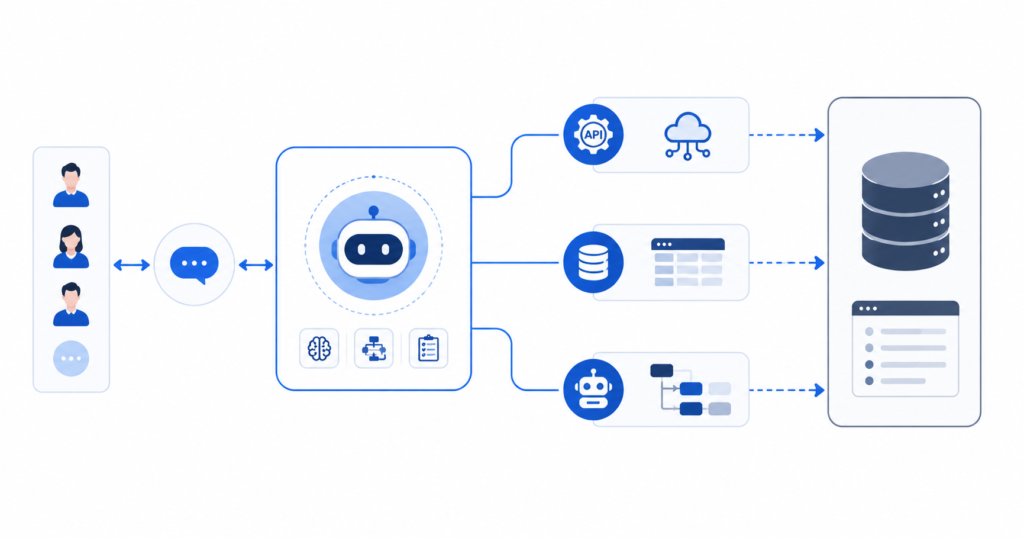
An AI agent is a software process that perceives inputs, makes decisions based on programmed or learned logic, and takes action — reading from or writing to connected systems. When applied to a legacy ERP, agents operate as a layer sitting between your human users (or automated triggers) and the ERP database.
They connect to the legacy system through one of three entry points:
| Connection Method | When It Applies | What It Requires |
|---|---|---|
| Application API / Web Services | ERP has exposed SOAP, REST, or OData endpoints | Credential access to API layer |
| Database Staging Tables | No web services, but direct database access is available | SQL read/write permissions to a staging schema |
| RPA (Robotic Process Automation) Bot | Closed system — terminal interface, desktop-only, green-screen | Screen interaction library (UiPath, Automation Anywhere, etc.) |
Most legacy ERP environments — older SAP deployments, Oracle JD Edwards, Epicor, Infor, Microsoft Dynamics GP, custom AS/400-based systems — support at least one of these connection methods. Often two or three are available in combination, depending on which module is being automated.
Critically: the agent layer does not change your ERP’s core logic, does not touch your schema, and does not require your ERP vendor’s involvement. The integration sits entirely outside the ERP boundary, communicating through controlled, auditable access points.
The Four Workflow Transformations That Supercharge Legacy Systems With AI Agents
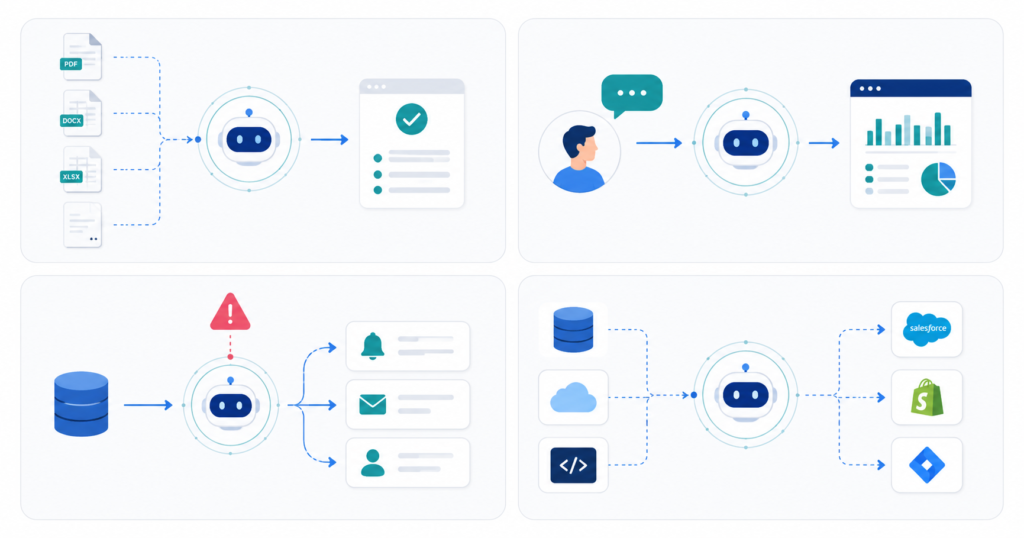
1. Automated Document Ingestion — Eliminating Manual Invoice Entry
Manual accounts payable processing is the highest-volume, lowest-value task in most ERP environments. Each supplier invoice requires a human to open it, extract the line items, validate them against the purchase order, and key the results into the ERP — a process that typically takes 15-30 minutes per document.
An AI agent automates the full cycle. When an invoice arrives via shared inbox or supplier portal:
- The agent reads the document using OCR and NLP, extracting header fields, line items, quantities, and pricing.
- It queries the ERP for the matching purchase order and validates the extracted data — quantities, prices, and tax codes — against contract terms.
- If the data matches within configured tolerance, the agent posts the goods receipt and invoice directly to the ERP without human involvement.
- If there is a discrepancy, the agent halts the transaction, flags the exception with a specific reason, and drafts a clarification request to the supplier for human review.
For a company processing 400-600 invoices per month — a typical mid-market volume — this automation recovers an estimated 30-50 hours of AP team time per week, based on industry benchmarks for invoice processing time. The team shifts from data entry to exception review.
2. Conversational ERP Querying — Reporting in Seconds, Not Days
Legacy ERP reporting is a two-person bottleneck. The business user needs a number. The IT analyst knows how to extract it. Between them is a report request queue, a multi-day wait, and a static spreadsheet that was already out of date when it arrived.
AI agents eliminate this gap by acting as a secure, natural language interface to your ERP’s data. Using a read-only SQL translation layer deployable via Slack, Microsoft Teams, or a dedicated web portal, business users query the ERP in plain language:
“What is our current open order backlog by region compared to the same week last year?”
The agent translates the request into a safe, rate-limited read query, retrieves the data, computes the comparison, and responds with a structured answer and a visual summary — in under ten seconds.
The database protection model matters here: agents operate through read-only connections with query rate limiting, preventing a single executive’s curiosity from degrading system performance for the entire business.
3. Proactive Exception Alerting — From Reactive to Predictive Operations
A legacy ERP is a passive system. It records transactions as they happen. It does not warn you that the stockout is coming, that the duplicate payment is about to run, or that the tax code is missing before the shipment goes out.
An AI monitoring agent scans transaction data in near-real-time against configurable business rules and surfaces exceptions before they become operational problems:
- Duplicate payment risk: Invoice #14891 totals $12,400 and was received 48 hours after Invoice #14804, which has an identical amount and the same supplier. Payment held — flagged for review.
- Stockout prediction: SKU-440 will reach zero inventory in an estimated 9 days based on current order velocity. Suggested reorder quantity and lead time provided automatically.
- Data quality failure: Shipment order #9821 has a delivery address that does not match the verified address on the customer account. Held for confirmation before dispatch.
The agent does not just fire an alarm. It provides the context, the risk level, and a recommended action — so the person reviewing the exception can act in seconds rather than spending twenty minutes reconstructing what happened.
4. Cross-System Data Sync — Replacing Brittle Point-to-Point Integrations
The average mid-market company runs 8-15 software systems alongside its ERP: a CRM, an e-commerce platform, a logistics system, a customer portal, a financial planning tool. Keeping these systems synchronized manually — or through the fragile custom scripts that typically connect them — is a constant operational drain.
AI agents act as a centralized integration orchestrator. When a new opportunity closes in Salesforce, the agent reads the deal data, maps the fields to the ERP’s order schema, validates customer and product codes, and creates the corresponding order in the legacy system automatically. When the ERP marks the order as “shipped,” the agent pushes the status update back to Salesforce and triggers the customer-facing shipping notification.
This is the operating model TechVedhas builds through its Advanced Integration & Automation Strategy — event-driven agent workflows that replace manual import/export routines with managed, auditable, bidirectional data pipelines.
The Real Numbers: AI Agent Layer vs. Full ERP Replacement
The comparison below is based on TechVedhas’s own project scoping data, Panorama Consulting Group’s published ERP research, and industry benchmarks for mid-market implementations.
| Dimension | Full ERP Replacement | AI Agent Layer on Existing ERP |
|---|---|---|
| Typical Investment | $3M – $25M+ (mid-market) | $15,000 – $50,000 initial build |
| Ongoing Cost | $200K-$500K+/year licensing and support | $1,500-$5,000/month support |
| Timeline to First Value | 18-36 months | 8-16 weeks |
| Operational Disruption | High — dual-run period, full retraining | Low — agents operate alongside existing workflows |
| Data Migration Risk | Very high — all historical data must be mapped | None — existing data stays in the existing system |
| ROI Timeline | 3-7 years | Typically 6-14 months |
| Vendor Dependency | High — multi-year licensing agreements | Low — agent layer is portable to any future ERP |
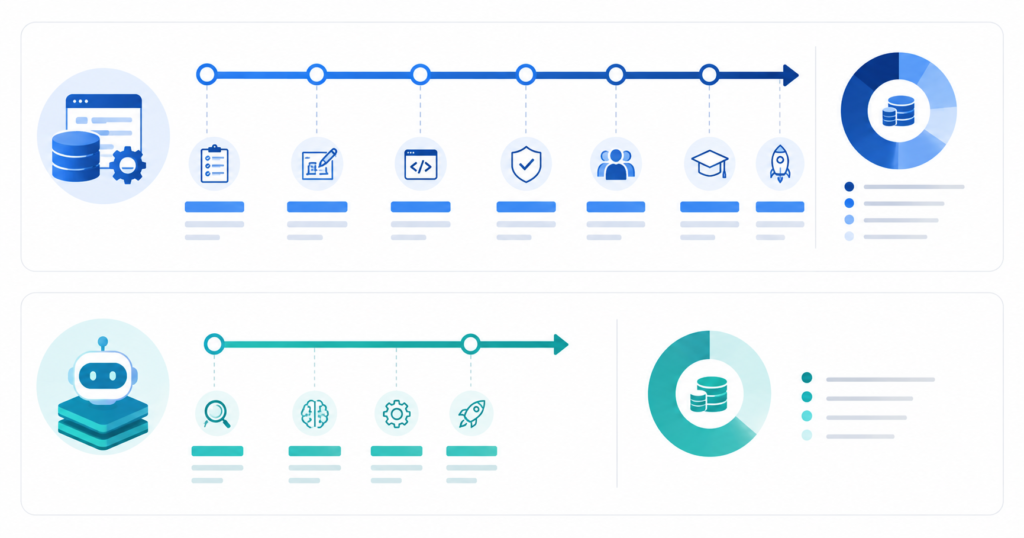
This comparison is not an argument that ERP replacement is always wrong. For companies with a system the vendor has officially end-of-lifed, a data architecture that can no longer support business volume at any level, or a compliance requirement that the existing ERP structurally cannot meet — a replacement project may be unavoidable.
But for the operational pain points that prompt most ERP modernization conversations — slow reporting, manual data entry, siloed systems, reactive exception handling — the AI agent approach resolves them at roughly 2-5% of a full replacement’s cost.
For more on structuring the investment decision and scoping technology costs, see our Software Project Timeline & Budget Factors 2026 analysis.
What a TechVedhas Legacy ERP Integration Engagement Looks Like
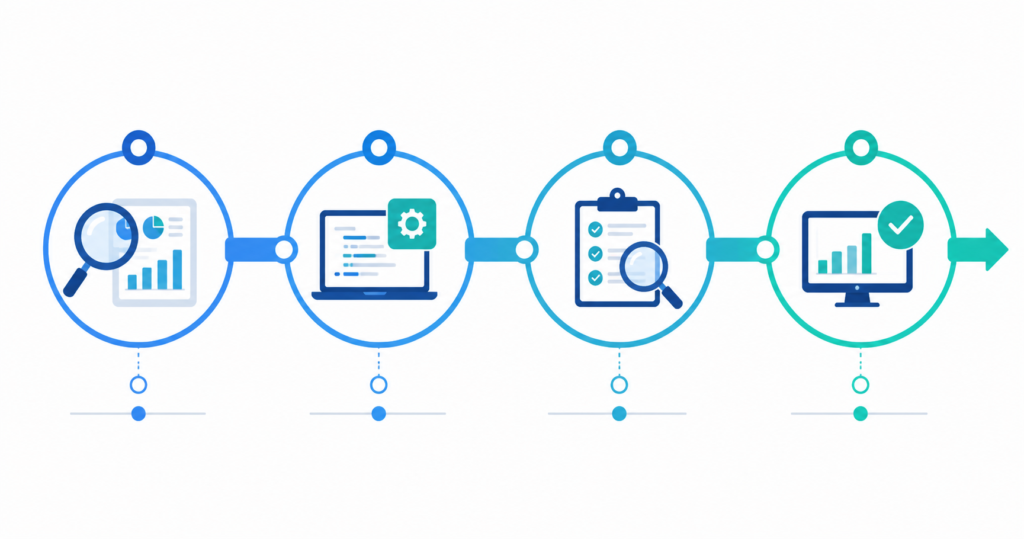
- Phase 1 — Discovery & Architecture (2 weeks)
We map your legacy ERP’s available integration entry points, identify the 3-5 workflows with the highest automation ROI, and produce a scoped technical architecture document with exact connection methods and data flow diagrams. - Phase 2 — Agent Build & Integration (5-8 weeks)
The agent orchestration layer is built, connected to the ERP through the agreed integration pattern, and individual workflow automations are configured and tested against your actual data. - Phase 3 — Testing & UAT (2-3 weeks)
Agents are tested against edge cases, exception scenarios, and load thresholds. Your operations team validates outputs before any workflow is connected to production data. - Phase 4 — Go-Live & Ongoing Support
The agent layer is promoted to production. Every agent action is logged and auditable. Ongoing support includes monitoring, configuration adjustments, and new workflow additions under the monthly support agreement.
When TechVedhas built the automated procurement workflow for ProcurePoint, the architecture prioritized exactly this phased approach — connecting the agent to the procurement data layer through validated staging tables, with human-approval gates on all transactions above a defined financial threshold.
Four Mistakes That Kill Legacy ERP AI Projects Before They Start
- Writing directly to production database tables.
Every agent write action must go through the ERP’s application API or a validated staging schema — never directly to raw production tables. Direct writes bypass business logic validation, risk relational integrity corruption, and can void vendor support agreements. This is the most common cause of failed legacy AI integration projects. - No rate limiting on legacy database reads.
Legacy databases were designed for human-speed transaction volumes. An AI agent querying at API speed without throttling can saturate database connection pools and degrade system performance across the entire business during peak hours. Every integration must include query queuing and rate limiting as a first-class requirement. - Automating inconsistent manual processes.
Agents automate what they observe. If your current AP process has four variations depending on which team member handles an invoice, the agent will automate all four variations at once — compounding the inconsistency at scale. Map and standardize the target workflow before building the agent, not after. - No human-in-the-loop for high-value decisions.
For workflows involving financial postings, inventory adjustments, customer refunds, or any transaction above a configurable threshold: require human confirmation before the agent commits. The agent surfaces the decision with full context; the human approves in one click. This is not a workaround — it is the correct operating model for production AI systems handling consequential actions.
FAQ — Modernize Legacy ERP with AI Agents: What Executives Ask
What exactly does it mean to modernize legacy ERP with AI?
It means deploying AI agents as an intelligent orchestration layer around your existing ERP system. The agents read and write data through APIs, database staging tables, or UI-based RPA bots — automating manual workflows, enabling conversational reporting, and proactively surfacing exceptions — without modifying the ERP’s codebase, schema, or data architecture.
Do we need to upgrade or re-architect the ERP before starting?
Not necessarily. A technical discovery session — typically 2 weeks — identifies which integration entry points are available on your specific system. Most legacy ERPs, including older SAP, JD Edwards, Epicor, Dynamics GP, Infor, and AS/400-based systems, support at least one viable integration method.
How is an AI agent different from the automation tools already in our ERP?
Built-in ERP automation modules are rules-based and operate only within the system’s own data boundary. AI agents understand unstructured inputs (PDF documents, email content, plain language queries), make context-aware decisions when encountering exceptions, and communicate across multiple systems simultaneously — handling work that falls outside what native ERP automation was ever designed to do.
How long does deployment take, and what does the process look like?
A production-ready AI agent layer on a legacy ERP typically deploys in 8 to 16 weeks: 2 weeks of discovery and architecture, 5-8 weeks of build and integration, 2-3 weeks of testing and user acceptance. Timeline scales with the number of workflows automated in the initial scope.
What ROI should we expect, and how quickly?
Most clients recover the initial integration investment within 6-14 months, primarily through labor cost reduction in manual data processing, faster operational decision-making through real-time reporting, and reduced error correction costs from proactive exception detection. A detailed ROI model is built as part of the discovery phase.
Can we start with one workflow and expand later?
Yes — this is the recommended approach. Start with the single highest-ROI workflow (typically accounts payable automation or conversational reporting). Once it is stable and the ROI is measurable, add workflows through the same orchestration layer. Each new workflow plugs into the existing integration architecture rather than becoming a separate system.
If we eventually replace the ERP, what happens to the AI layer?
The agent layer is fully portable. Business logic, routing rules, workflow configurations, and validation scripts all sit outside the ERP boundary. When a future migration occurs, the agents are reconnected to the new system’s endpoints. The automation logic does not need to be rebuilt — only the integration connection points are remapped.
Your ERP Isn’t Failing You. The Gap Around It Is.
The operational frustrations driving ERP replacement conversations — the manual keying, the two-day reports, the missed exceptions, the disconnected systems — are not symptoms of a broken database. They are symptoms of a gap: the space between what your ERP faithfully records and what your team needs in order to act.
AI agents close that gap. They do not replace the reliable transactional core your business has run on for a decade. They build an intelligent operating layer around it — one that automates the repetitive, surfaces the exceptional, answers the urgent in real time, and connects the disconnected.
The result is an operation that feels modern, without the cost, risk, and disruption of a project that may still be running when your current CFO has retired.
If you are evaluating whether your legacy ERP environment is a candidate for AI agent integration, TechVedhas offers a structured technical discovery engagement. We assess your available integration entry points, identify the three to five workflows with the clearest ROI, and deliver a scoped estimate with a realistic timeline.
— no commitment, no generic pitch. We assess your specific system and identify what is actually worth automating first.
For a detailed look at how AI adoption fits into broader legacy infrastructure decisions, read our Legacy Infrastructure Modernization for AI Adoption guide.